
How To Use Codes
Redeeming Codes is quite straightforward in Universal Piece.
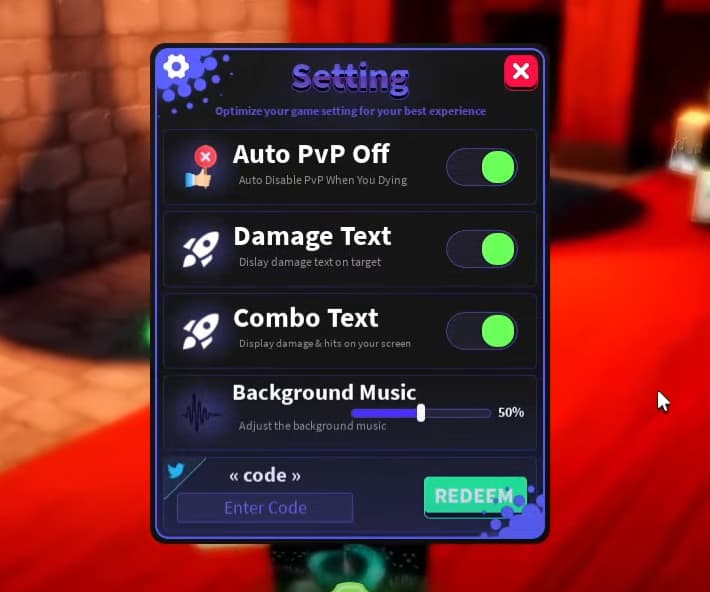
Players will need to do the following:
- Open up the Settings menu, by pressing the “Gear” icon on the left-hand side of the screen
- At the bottom of the Settings Menu, enter one of the codes in the “Enter Codes” section
- Click on the “Redeem” button to claim the Rewards
Codes List
Below you’ll find a list of all the currently available Codes in Universal Piece.
Note: All of the Codes are case sensitive.
| Code | Reward |
|---|---|
| SORRYFROMPIKACHU | + 5000 Gems |
| ILOVEYOU | + 5000 Gems |
| SorryForBugGamepass. | Perm Exp x2 Perm Yen x2 Perm Drop chance x2 |
| Sorryforanything | + 15,000 Gems |
| SorryForShutdown | + 200 Gems |
| RELEASE! | + 50 Gems + 15,000 Yen |
| RE-RELEASE! | + 5000 Gems |
| BiBoss | + 50 Gems + 15,000 Yen |
| Zeroian | + 50 Gems + 15,000 Yen |
| Pikachu | + 50 Gems + 15,000 Yen |
| Butterbear | + 50 Gems + 15,000 Yen |
| 3llzr | + 25 Gems + 15,000 Yen |
| fozesalishane | + 25 Gems + 15,000 Yen |
Comments
Sign in to post a comment.
No comments yet. Be the first to comment!